Tech for a Balanced Life: Top Digital Wellbeing Tools & Apps to Reclaim Your Focus
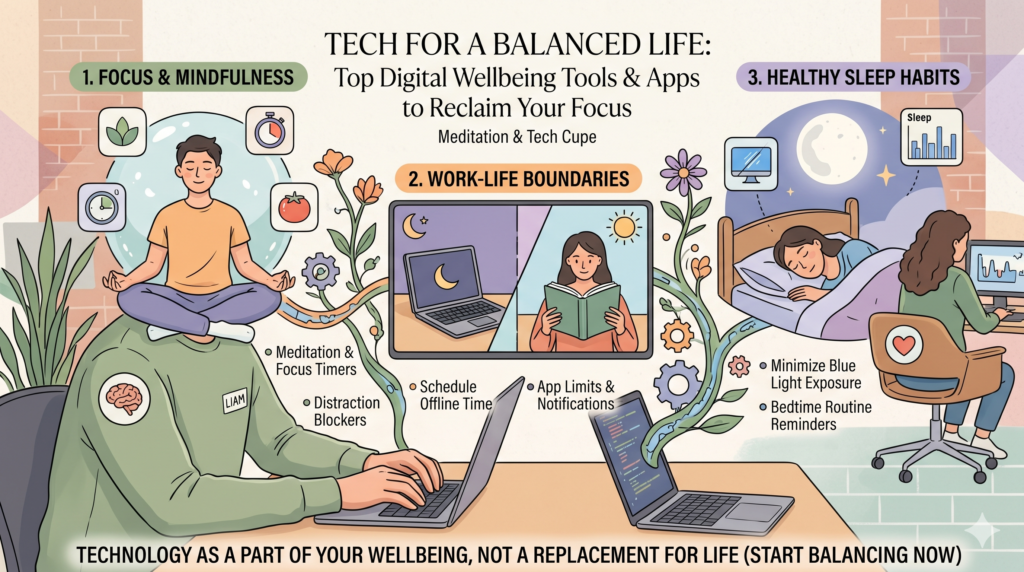
Tech for a Balanced Life: Top Digital Wellbeing Tools & Apps to Reclaim Your Focus
In our increasingly connected world, smartphones, tablets, and computers have become indispensable. They power our work, connect us with loved ones, and entertain us. Yet, this constant connectivity often comes with a hidden cost: fractured focus, increased anxiety, and a persistent feeling of being ‘always on.’ This is where the concept of digital wellbeing steps in, offering a pathway to a healthier, more intentional relationship with our devices.
Far from advocating a complete digital detox, digital wellbeing is about finding equilibrium. It’s about leveraging technology’s benefits without letting it overwhelm our lives. Thankfully, a growing ecosystem of digital wellbeing tech tools and apps is emerging to help us achieve just that. These solutions are designed to empower you, giving you back control over your screen time, improving concentration, and fostering mindful interaction with your digital world.
Understanding Digital Wellbeing
Digital wellbeing isn’t just a buzzword; it’s a critical aspect of modern health. It encompasses the impact of our digital habits on our mental, physical, and emotional health. From the blue light disrupting our sleep to the constant notifications fragmenting our attention, technology’s downsides are becoming increasingly apparent. Recognizing these impacts is the first step towards managing them effectively.
A balanced digital life means setting boundaries, understanding your usage patterns, and making conscious choices about how and when you engage with technology. It’s about being proactive rather than reactive to the endless stream of pings and updates. The right tools can act as your allies in this endeavor, providing insights and nudges to guide you toward healthier habits.
Why Digital Wellbeing Matters Now More Than Ever
The average adult spends several hours a day looking at screens, a figure that continues to climb. This extensive screen exposure has been linked to various issues, including eye strain, sleep disturbances, reduced attention spans, and even an impact on mental health. Social media, in particular, often creates comparison traps and can fuel feelings of inadequacy or anxiety.
Furthermore, the ability to focus deeply has become a rare commodity. Our brains are constantly being retrained by short-form content and instant gratification, making sustained concentration on complex tasks increasingly difficult. Reclaiming our attention and mental peace is not just a personal goal; it’s becoming a necessity for navigating a demanding world. Digital wellbeing tech tools provide practical solutions to these modern challenges, helping us to carve out pockets of calm and concentration in our busy lives.
Essential Digital Wellbeing Tech Tools and Apps
For Screen Time Management
-
Native OS Tools: Digital Wellbeing (Android) & Screen Time (iOS)
Both Android and iOS have integrated powerful tools directly into their operating systems. These are often the best starting point. Digital Wellbeing on Android provides a daily view of app usage, allowing you to set app timers, activate a ‘Wind Down’ mode that grays out your screen before bedtime, and manage notifications. Similarly, Apple’s Screen Time for iOS offers detailed reports on app usage, categories, and allows for setting app limits, downtime, and content restrictions. Understanding your baseline usage with these tools is crucial for identifying areas for improvement.
Learn more: Android Digital Wellbeing | Apple Screen Time -
Forest App
The Forest App gamifies the process of staying focused. When you want to avoid using your phone, you plant a virtual tree. If you leave the app or use other apps during the timer, your tree withers. Successfully staying focused grows a tree, which contributes to a virtual forest. This simple yet effective concept leverages positive reinforcement and a sense of accomplishment, even partnering with a real-life tree-planting organization for a tangible impact. It’s an excellent way to break the habit of mindlessly checking your phone. -
RescueTime
RescueTime runs in the background on your computer and mobile devices, tracking how much time you spend on applications and websites. It then categorizes your activities as productive or distracting. The magic lies in its detailed reports and weekly emails, which provide insights into your digital habits. You can set goals, block distracting websites, and get alerts when you’ve spent too much time on a particular activity. For those serious about understanding and optimizing their digital workflow, RescueTime is an invaluable analytical tool.
For Enhanced Focus and Productivity
-
Freedom
Freedom is arguably one of the most robust internet and app blockers available. It allows you to block distracting websites and apps across all your devices (Mac, Windows, iOS, Android, Chrome) for a set period. Whether you’re working on a critical project, studying, or just want uninterrupted personal time, Freedom creates a distraction-free environment. Its customizable blocklists and scheduling features make it highly versatile for various scenarios, from short focus sprints to an entire evening of digital detox. -
Cold Turkey Blocker
Similar to Freedom but with an emphasis on extreme lockdown, Cold Turkey Blocker is perfect for those who need serious intervention against distractions. Once you start a block, there’s no going back – you cannot uninstall the app or stop the timer until the session is over. It supports blocking websites, applications, and even the internet entirely. This ‘no mercy’ approach is incredibly effective for combating procrastination and ensuring you stay committed to your focus sessions. It’s available for Windows and Mac. -
Toggl Track / Clockify
While primarily time tracking tools, Toggl Track and Clockify are excellent digital wellbeing tech tools because they foster awareness. By manually or automatically tracking the time you spend on various tasks and projects, you gain a clearer picture of where your hours truly go. This mindfulness about time allocation can highlight how much time is lost to context-switching or unproductive activities, serving as a powerful motivator to improve focus and manage digital interactions more deliberately.
For Mindful Device Usage and Sleep
-
Calm / Headspace
While not directly blocking apps, meditation and mindfulness apps like Calm and Headspace play a crucial role in digital wellbeing. They help train your mind to be more present and less reactive to digital stimuli. Regular meditation can improve focus, reduce stress from constant connectivity, and even prepare you for better sleep by unwinding your mind from the day’s digital overload. Using these apps mindfully can be an excellent way to replace unproductive screen time with beneficial activities. -
f.lux / Night Shift (built into iOS/macOS)
Exposure to blue light from screens, especially in the evening, can suppress melatonin production and disrupt your sleep cycle. f.lux (for Windows, Mac, Linux) and Apple’s built-in Night Shift feature automatically adjust your screen’s color temperature to warmer tones as the sun sets. This simple yet effective tweak can significantly reduce eye strain and help your body prepare for a more restful night’s sleep, directly contributing to your physical digital wellbeing.
Beyond the Tools: Cultivating Healthy Habits
While digital wellbeing tech tools and apps are powerful allies, they are most effective when coupled with conscious habit changes. Technology is a tool, and like any tool, its impact depends on how we wield it. Here are some actionable steps to complement your chosen tools:
- Establish ‘Tech-Free’ Zones: Designate certain areas (e.g., the dining table, bedroom) or times (e.g., the first hour after waking, the last hour before bed) as device-free.
- Curate Your Notifications: Turn off all non-essential notifications. Only allow those that are truly urgent or from people you want to hear from immediately.
- Schedule Digital Breaks: Take regular short breaks from screens during work or study. Look away, stretch, or walk around.
- Prioritize Real-World Interactions: Make an effort to connect with friends and family in person, or engage in hobbies that don’t involve screens.
- Reflect Regularly: Periodically review your usage reports from your digital wellbeing apps. What patterns do you see? What adjustments can you make?
FAQ Section
How do I know if I need digital wellbeing tools?
If you find yourself constantly distracted, struggling to focus, experiencing eye strain or sleep issues, or feeling overwhelmed by notifications, these are strong indicators. A simple test is to try going an hour without your phone; if that feels challenging, these tools could offer significant benefit.
Are these tools really effective?
Yes, when used consistently and intentionally. The effectiveness of digital wellbeing tech tools isn’t just in their features but in how they empower you to become more aware of your habits and enforce boundaries. They provide the structure and data needed for sustainable change.
Can digital wellbeing tools also enhance productivity?
Absolutely. By minimizing distractions, managing screen time, and fostering periods of deep focus, these tools directly contribute to improved productivity. Less time spent mindlessly scrolling means more time and mental energy available for meaningful work and activities.
What’s the best way to start using these tools?
Begin with the native tools on your smartphone (Digital Wellbeing or Screen Time) to understand your current usage. Then, identify your biggest pain point – is it social media, general distraction, or sleep? Choose one or two targeted apps that address that specific issue and integrate them gradually into your routine.
The Path to a More Balanced Digital Life
Embracing digital wellbeing isn’t about shunning technology; it’s about mastering it. By incorporating the right digital wellbeing tech tools and apps into your life, you can transform your relationship with your devices from one of constant reaction to one of conscious control. These solutions offer practical, actionable ways to reduce screen time, improve focus, and cultivate a healthier, more balanced existence.
Experiment with the recommendations, find what resonates with you, and commit to building mindful digital habits. Your attention, your peace of mind, and your overall wellbeing are worth the investment.
Category: TECH GUIDES
Tags: digital wellbeing, screen time, productivity apps, focus tools, healthy tech habits, digital detox, app recommendations, tech guides